The Peggy's Post game gives a familiar sorting task an unusual home: a lighthouse post office. A parcel on a desk is a small problem you can understand, but running the place asks you to connect those small decisions into a routine. If you like games about handling objects, checking details, and gradually making a workspace feel manageable, this is one to explore.
This beginner's guide focuses on building that routine. The game facts and controls come from the creator's page; the suggested workflows and spending questions are our editorial advice. We have not turned them into a guaranteed winning schedule, because the useful first step is understanding your own decisions.
What is the Peggy's Post game?
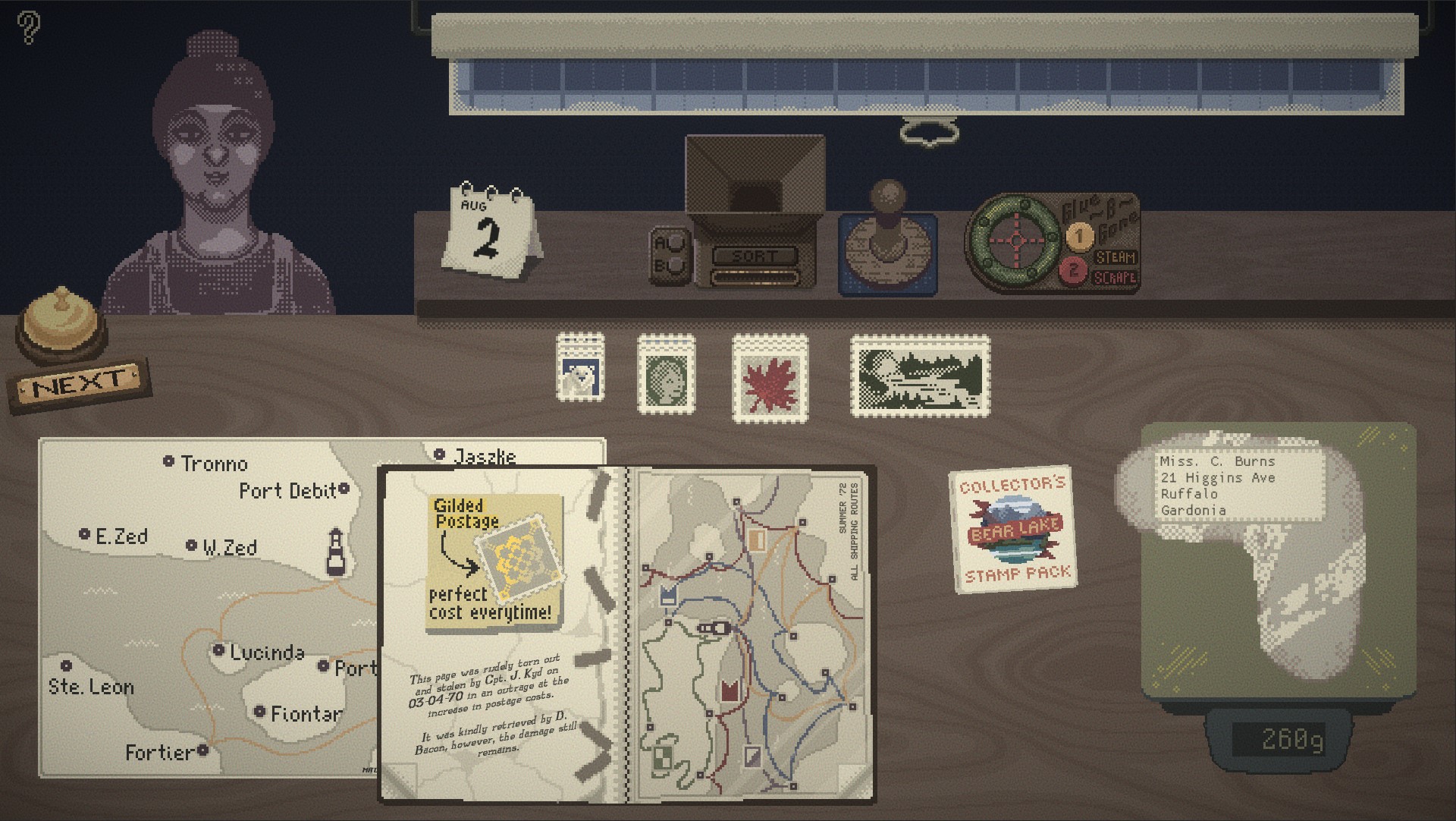
digitarium's original itch.io page describes a lighthouse post office where you sort mail, assign postage, and choose delivery vehicles. Earnings support tools, stamps, and ships while you work toward repaying a loan. The source offers browser play plus Windows and macOS downloads.
That premise has two layers worth keeping separate. One is the immediate handling of a piece of mail. The other is deciding whether the office has the resources it needs for the next stretch of work. Our advice is to learn the first layer before trying to optimize the second.
An attractive workspace can make a task look self-explanatory. Do not let that feeling discourage you if your first few decisions take time. In a game about procedures, learning where to find the right information is part of the experience, not a detour from it.
Choose seven-day mode for your first visit
The creator recommends seven-day mode because it introduces mechanics gradually. Endless mode begins with all mechanics available, and the page notes that there is no explicit tutorial. Read the game's notes and experiment carefully rather than expecting every step to be explained in sequence.
For a first session, gradual introduction gives you a useful advantage: fewer unfamiliar decisions compete for attention at once. When a new tool or requirement appears, identify the problem it addresses before adding it to your routine. Understanding why something exists makes it easier to remember when to use it.
Consider endless mode once handling the desk feels familiar and you would rather begin with the wider set of options. That is a preference about learning pace, not a claim that one mode is always easier. A player who enjoys exploring a busy system may be happy to accept more uncertainty immediately.
Learn the controls in small groups
The published controls include:
- Left-click to hold an item; right-click or R to rotate or use it.
- Tab to toggle shipping inventory and the mistake preview.
- W and E to turn pages; Q to toggle storage after it unlocks.
- D for the next customer; A to end the day.
The creator also explains that folded page corners can be clicked. Check the original page for the complete shortcut list and current details.
Our suggestion is to learn object handling first, information shortcuts second, and customer or day controls last. Keep the reference nearby and add a shortcut when it solves a task you have already understood with the mouse.
Build a repeatable mail-checking routine
Try a simple editorial workflow: inspect, identify, verify, and dispatch. Those words describe a thinking process, not an official in-game command sequence. The aim is to give each piece of mail a consistent place in your attention.
Start by reading what is actually in front of you. Identify the information relevant to the current requirement, then consult the game's references where necessary. Before finishing, check that the choices you made agree with one another. A correct destination is only one part of a job if you also need to make a postage decision.
If something is uncertain, keep it visible rather than mentally marking it complete. Imagine that you understand where an item should go but are unsure about one associated requirement. Treating it as "nearly done" can make you forget the unresolved part. Treating it as "waiting for a check" tells you precisely what to do next.
Repeat the same order for a few items before trying to move faster. Consistency gives you a baseline. Once the process feels reliable, you can notice which step is slow and improve it without losing the rest of the routine.
Use the reference material purposefully
When a detail sends you to a book or map, ask a specific question before opening it. "Which destination matches this information?" is easier to answer than "What am I supposed to do?" A narrow question helps you recognize the useful entry without rereading everything.
As you learn where information lives, distinguish memory from verification. Remembering a likely answer can guide your search, but checking the reference is sensible when the decision matters or a new rule changes the situation. The goal is a dependable routine rather than a performance of perfect recall.
Avoid trying to memorize the entire system during the first visit. Make a short private note about where to look instead. A note such as "check the route reference before dispatch" remains useful even when the specific destination changes.
If a reference seems to contradict your expectation, return to the item and read it again. You may be comparing the wrong details. This back-and-forth is more productive than forcing the item into a category simply because you have used that category recently.
Keep the desk understandable
Our workspace suggestion is to separate what is active from what you are merely consulting. If you can tell which object currently needs a decision, you are less likely to spend time rearranging everything without advancing the job.
Use deliberate movements when learning how objects respond. Observe the result of an action before immediately trying another input. A rotation, an interaction, and a placement can look similar from a distance while serving different purposes. Slow observation early can spare you confusion later.
If the desk becomes difficult to read, pause the flow of new work long enough to understand the current item. Choose one unresolved task, finish its check, then reconsider the rest. This is a planning suggestion; follow the actual game's rules about what can be moved or changed.
For display comfort, use a screen large enough to read the references and distinguish the objects.
Spend with a question in mind
Before buying an upgrade, explain what problem it should solve. Is your current difficulty understanding instructions, handling objects, or lacking a resource the work requires? A purchase may address one of those issues without addressing the others.
Then compare the benefit with the money you need to keep available. The useful question is not simply whether you can afford something now, but whether the purchase supports the next part of your plan. Our advice is to avoid spending solely because an option has become available.
For example, if your routine is still inconsistent, you might decide to understand one more work cycle before choosing an improvement. That is a hypothetical decision process, not a claim about a particular upgrade's value. Once you know where the delay comes from, you can judge whether a tool is relevant.
Keep the broader goal visible when making small purchases. A pleasant individual transaction can still leave you short of resources for something more important. Review the game's current requirements rather than relying on a spending order found for an older version.
Learn from a mistake without rebuilding everything
When something goes wrong, locate the step where your information became unreliable. Did you misread the item, consult the wrong reference, or choose an action before completing a check? Each answer points to a different improvement.
Change the process at that point and keep the parts that were working. If the issue was interpretation, slowing every mouse movement is unlikely to solve it. If it was handling, memorizing another page may not help. Match the adjustment to the cause.
This makes management feel less mysterious. You are not searching for one secret trick; you are gradually building a routine you can explain and repeat.
Frequently asked questions
Where do I play Peggy's Post?
Follow the play link to digitarium's page on itch.io. Read any current instructions there before starting, and use that source for updated build information.
Is there a walkthrough on this page?
No fixed seven-day solution is included. The guide helps you organize decisions without revealing a prescribed sequence of purchases or outcomes.
Is Peggy's Post playable on a phone?
Touch support has not been verified for this listing. We recommend a desktop setup for the published mouse and keyboard controls; the responsive guide itself remains readable on a smaller screen.
What if I accidentally end the day?
Check the game's current recovery and save options. This guide does not promise an undo or a way to restore every action. Learning the relevant shortcut before using it is the most dependable precaution we can suggest.
What should I try after this game?
Explore Alpine for a different practical-task premise, or Rulehouse if you prefer compact board puzzles to organizing a desk.
Start the Peggy's Post game with room to learn one procedure at a time. Read the item, check the reference, finish the decision, and let a workable routine grow from those small, clear steps.